0 Commission + Balance Licenses & Software Web & SEO
No password needed · Instant delivery · 24/7 support
FREE · TURKISH · WINDOWS

Manage your cameras from one program

Sosyal Vizyon brings your IP cameras, NVRs and DVRs together. Watch live, record, and search past footage down to the second. It works with Hikvision, Dahua and ONVIF compatible devices.

Free Download
Version 1.1.0Windows 10 / 11 (64-bit)Interface Turkish
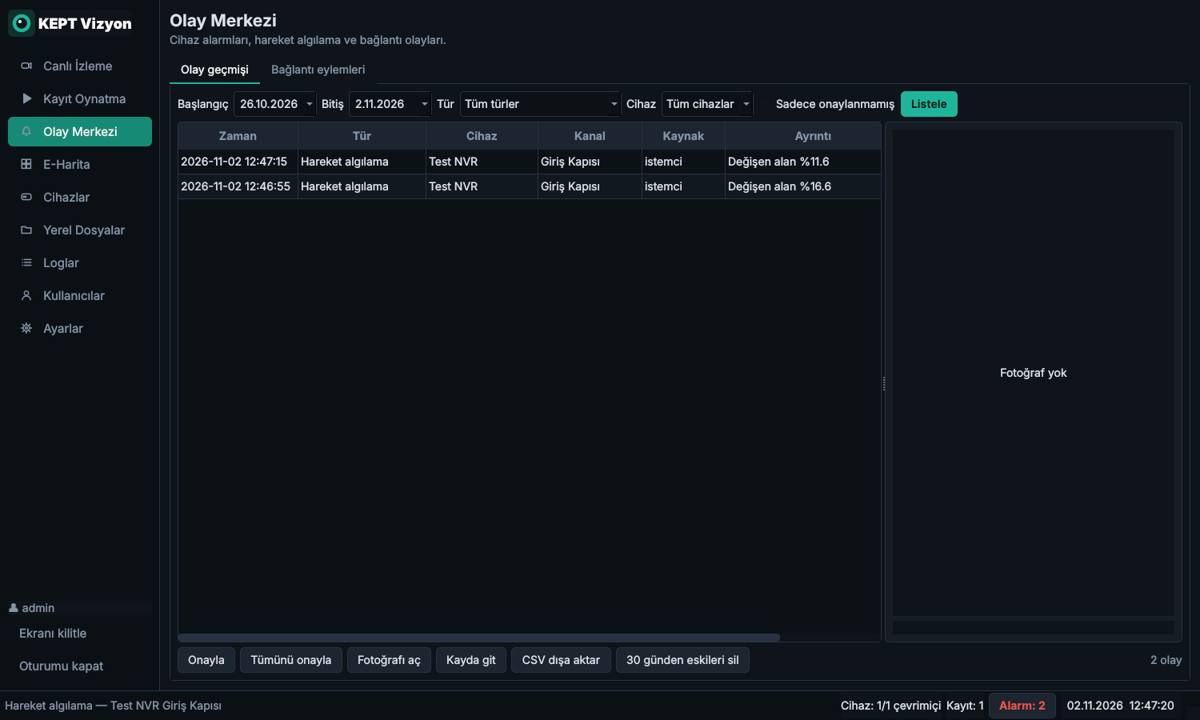
Sosyal Vizyon live view: multi-camera display with PTZ control

Which devices does it work with?

Watch devices of different brands side by side on the same screen; you do not have to stick to one brand.

HikvisionHiLookDahuaImouAmcrestUniviewReolinkTP-Link VIGI / TapoAxisXMEyeONVIF compatible IP camerasRTSP capable devices

Everything you need to manage security cameras

For anyone watching a home, a shop or a multi-camera site.

Up to 36 cameras on one screen

Layouts with 1, 4, 6, 8, 9, 13, 16, 25 and 36 panes. Drag and drop a camera, double-click for full screen.

Search recordings by date

Pick recordings from the NVR, DVR or camera SD card on a calendar and play four cameras in sync.

Recording to your computer

Continuous, weekly schedule or motion-only recording. When the disk is full the oldest recordings are deleted automatically.

Alarms and alerts

Sound alerts, snapshots and automatic recording on motion, camera tampering, area intrusion and connection loss.

PTZ control

Pan, tilt, zoom, focus and iris. Save preset positions and set up automatic patrols.

Audio and two-way talk

Listen to the camera; on Hikvision and Dahua devices talk through the camera speaker with your microphone.

Network device discovery

No need to hunt for IP addresses: the Find on network button lists NVRs, DVRs and cameras on your local network.

E-map

Place cameras on a floor plan or site sketch; a camera in alarm blinks red on the map.

Users and permissions

Administrator, operator and viewer roles. Decide who can watch live and who can delete recordings.

Find old recordings without going to the recorder

If you know the time of the event, you reach the footage in a few clicks.

  • Search recordings on the NVR, DVR or camera SD card
  • Zoom the timeline with the mouse wheel
  • Skip 5 and 30 seconds back or forward, play up to 16x faster
  • Save any section as MP4 and take snapshots
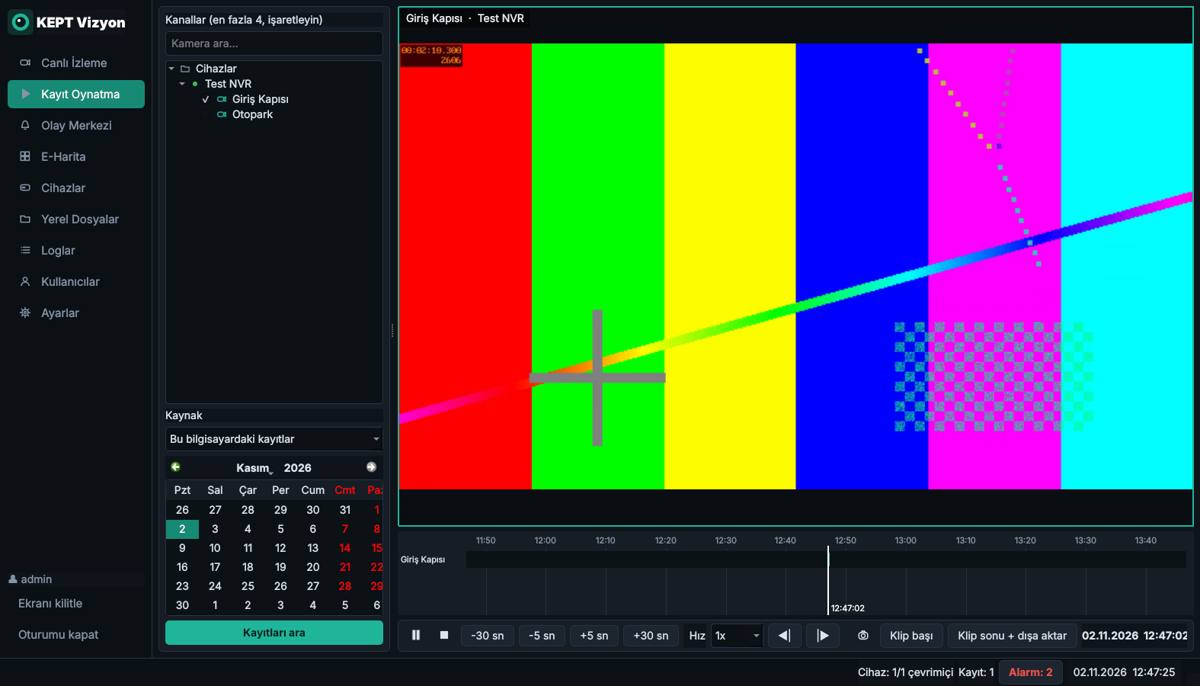
Playback screen: timeline, calendar and clip export

Be the first to know when something happens

The program keeps running in the system tray; recording and alarms never stop.

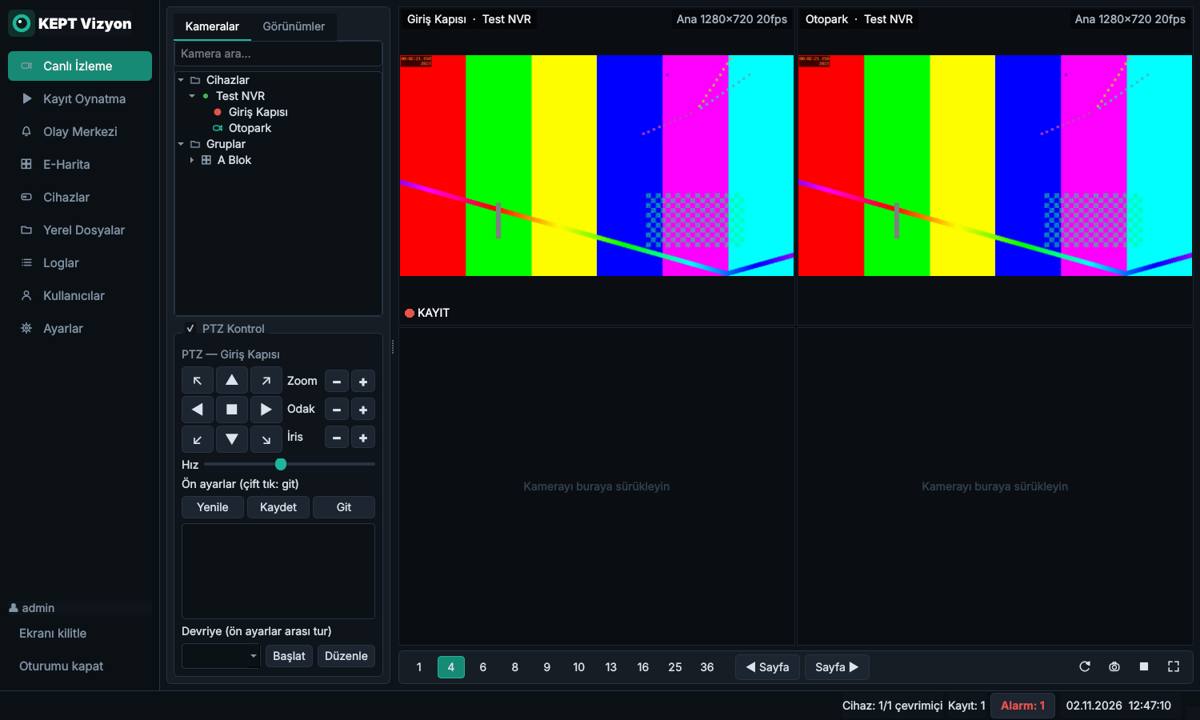
  • Motion, tampering, line-crossing, area-intrusion and video-loss alarms
  • Pop-up, sound alert, snapshot and recording options for each event
  • Event history and one-click jump to the related recording
  • Instant warning when a device connection drops; export event logs as CSV
Event center: motion detection alarm list

Setup: start watching in minutes

You do not need to install extra programs or drivers.

  1. Download the programClick the Free Download button. Google Drive may say it cannot scan large files for viruses; use the Download anyway option.
  2. Extract it to a folderRight-click the downloaded RAR file and choose Extract here. You can move the folder, for example to C:\SosyalVizyon.
  3. Open the programDouble-click the exe file in the folder. Create a desktop shortcut for easy access.
  4. Set an administrator passwordOn first launch, create your username and password.
  5. Add your camerasFrom the Devices menu choose Find on network, select the NVR/DVR or camera from the list, enter the device username and password, and add it.
Windows warning: If Windows protected your PC appears on first launch, choose More info, then Run anyway. This warning appears for new and rarely downloaded programs.
Keep the whole folder: The program works together with the subfolders next to the exe file. Do not copy only the exe file elsewhere.

System requirements

The more cameras, the more processing power you need. With more than 4 panes the program automatically uses the low-resolution stream.

MinimumRecommended (16+ cameras)
Operating systemWindows 10 (64-bit)Windows 11 (64-bit)
ProcessorIntel i3 / AMD Ryzen 3Intel i5 / AMD Ryzen 5 or higher
Memory4 GB8 GB or more
Disk1 GB (program)Separate disk for recordings
NetworkSame local network as the cameras or reachable IPWired connection

Frequently asked questions

The most common questions about camera management software.

Is Sosyal Vizyon free?

Yes. You can download and use it for free.

Which brands does it work with?

It works with Hikvision, HiLook, Dahua, Imou, Amcrest and every IP camera, NVR and DVR that supports ONVIF. Devices with a known RTSP address, such as Uniview, Reolink, TP-Link VIGI/Tapo, Axis and XMEye, can also be added with ready-made templates.

How do I view my NVR or DVR on my computer?

Open the Devices menu and click Find on network. Devices on your local network are listed; enter the username and password, add them, then drag cameras from the left list onto the screen.

Can I watch old recordings stored on the NVR?

Yes. Pick a date on the Playback screen and click the moment you want on the timeline. On Hikvision, Dahua and ONVIF Profile G devices you can also save any section as an MP4 file.

Can it replace iVMS-4200 or SmartPSS?

It offers the core functions such as live view, playback, PTZ, alarms and user management in one program, and you can watch different brands on the same screen.

The image does not appear. What should I do?

Check that the device username and password are correct and that the computer is on the same network as the camera. Select the device on the Devices screen and press Refresh channels. If the problem continues, make sure RTSP is enabled in the device settings.

Can I listen to the camera and talk through it?

To listen, click the speaker icon on the video window (audio encoding must be on in the camera). On Hikvision and Dahua devices you can talk through the camera speaker with the microphone icon.

Does recording stop if I close the window?

No. The program minimizes to the system tray and recording and alarms continue. To quit completely, right-click the tray icon and choose Exit.

Bring your cameras together on one screen

Free, brand-independent camera management software.

Download Sosyal Vizyon for Free

Version 1.1.0 · Windows 10 / 11 · RAR archive