
Mail PST Splitter - Split Large Outlook PST Files by Size, Folder or Year
Mail PST Splitter is a Windows tool that divides large Outlook PST files into smaller files of the size you choose. Turn bloated, slow or hard-to-back-up PST archives into clean, portable files in one go.
How to Split an Outlook PST File
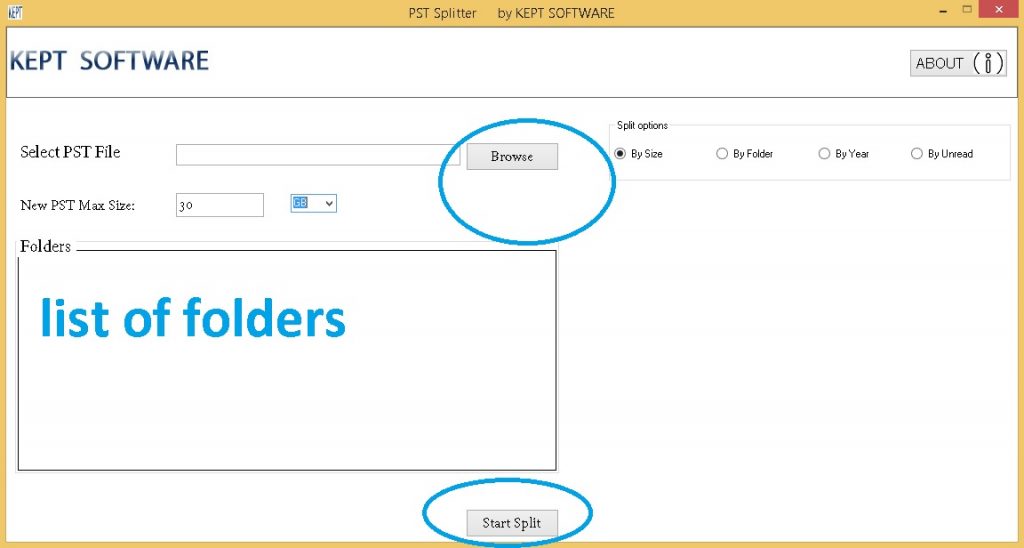
You choose how the file is split:
- By size: cut the PST into parts of the size you set.
- By folder: move folders such as Inbox or Sent Items into separate PST files.
- By year: separate older years of mail into their own archives.
- By unread items: pull unread messages into a separate file.
What Can Be Split?
Mail PST Splitter handles PST files containing emails, contacts, journals, notes and tasks. It can split data at any size without interruption.
Why Mail PST Splitter?
- Helps reduce the slowness and opening problems caused by very large PST files.
- Smaller files are easier to back up, move and share.
- Pick the split rule (size, folder, year, unread) that fits your needs.
- Licenses are available for individuals and for multi-user organizations.
Good to Know
The largest PST size that can be opened depends on your computer's RAM.
License Options
Choose the plan that fits: Personal (2 installs), Business (30 / 60 / 100 installs) or Enterprise (1000 installs). Your license key is delivered by email after purchase. You can download the trial version and test the program before buying.
FAQ
What is a PST file and why split it? A PST is the archive file Microsoft Outlook uses for emails, contacts, tasks and notes. When it grows very large Outlook can slow down; splitting makes it easier to manage.
How can I split a PST? By size, folder, year or unread items.
Are contacts and tasks split too? Yes - besides emails, contacts, journals, notes and tasks can be split.